Need more credits to fuel your outreach efforts? No problem! This article will guide you through the process of purchasing additional credits and explain how they can help you discover more leads and grow your business.
Credits allow you to access and retrieve contact details for individuals or businesses. These credits are essential for acquiring information such as email addresses and phone numbers.
Each time you perform a contact search step in your campaign, a credit is deducted from your account. If you've run out of credits, you can easily purchase more to continue searching.
Follow these simple steps to purchase more credits:
Go to 'Get more credits' in the bottom-left of the navigation sidebar and the following pop-up will show up:
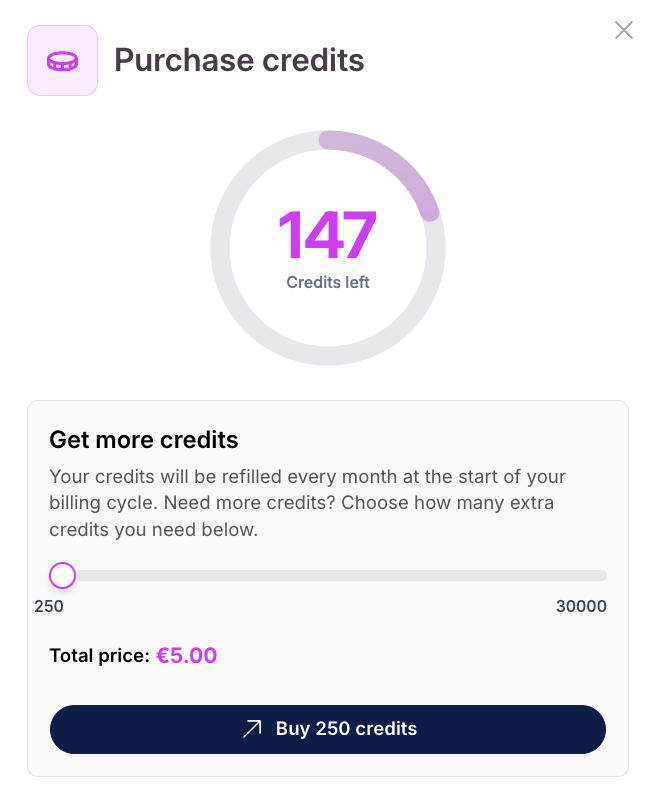
Adjust the slider to your preferred amount of credits
Click on "Buy … credits" and complete the purchase. You will be directed to Stripe
Once the transaction is processed, the credits will be added to your account immediately
You can check your updated credit balance under the Credits section.
Here's a breakdown of the pricing:
250 credits = €5
Here’s a breakdown of the costs:
1 Email = 3 credits
1 Phone number = 30 credits
Lead Qualification task = 1 - 2 credits / source / lead
Monitor your credit balance regularly to avoid interruptions in your campaigns
Consider purchasing credits in bulk to ensure continuous lead generation
Credits never expire, so you can buy them in advance for future campaigns
Keep track of your usage patterns to determine the right amount of credits for your needs
