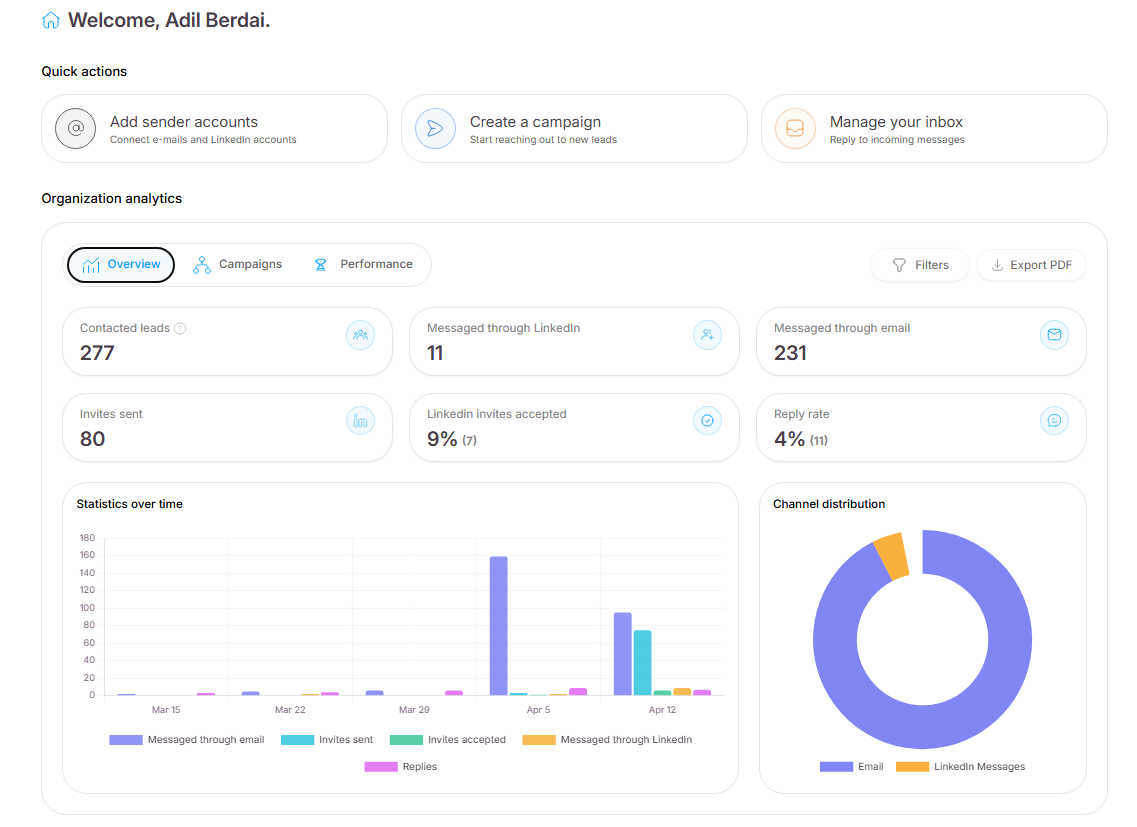
Get to know your numbers! Your Seleqt Dashboard is designed to give you instant insights into your outreach performance.
⚡ Quick Actions
Located at the very top of your screen, these shortcuts let you bypass the side menu so you can instantly:
➕ Add sender accounts
🚀 Create a new campaign
✉ Manage your inbox
Dive into your data using the three main tabs:
👁🗨️ Overview: Your bird's-eye view. Track your total contacted leads, messages sent, and overall reply rates using interactive visual charts.
📋 Campaigns: The nitty-gritty details. View a complete list breakdown of every single campaign and its individual performance metrics.
🏆 Performance: The leaderboard. Visually compare your top-performing campaigns side-by-side to easily identify your most successful messaging.
Need to drill down into specific data or share it with your team? Use the tools on the top right:
🎯 Filters: Click to narrow down your analytics by Date Range, Campaigns, Campaign Status (Active/Paused/Draft), or Sender Accounts.
📥 Export PDF: Click to instantly download a clean, ready-to-share PDF report of the exact analytics currently displayed on your screen.
With your dashboard insights at your fingertips, tracking your success and optimizing your outreach is easier than ever.