Sometimes a prospect is a better fit for a different outreach flow, or maybe you want to move them to a specialized follow-up campaign. Seleqt makes it incredibly simple to shift your leads around without losing any of their data.
Ready to reorganize? Here is your quick action guide to moving leads:
1. Select Your Leads
Open your current campaign and go to the Leads tab. Check the box next to the name of the lead (or multiple leads) you want to transfer.
2. Open the Actions Menu
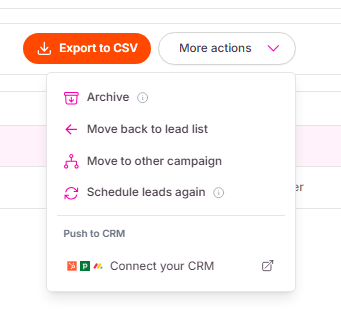
Once your leads are selected, a new menu will appear at the top of your list. Click on More actions and select Move to other campaign from the dropdown list.
3. Choose Their New Home
A pop-up window will appear. Use the dropdown menu to select the destination campaign. You can pick an existing campaign or even create a brand new one right from this screen!
4. The Golden Rule: Check the Box!
Seleqt has a built-in safety feature to prevent you from accidentally emailing the same person twice. If the lead you are moving has ever been part of another campaign, you will see a yellow warning message.
To successfully move them, you must check the box that says: Allow adding leads that already exist in other campaigns.
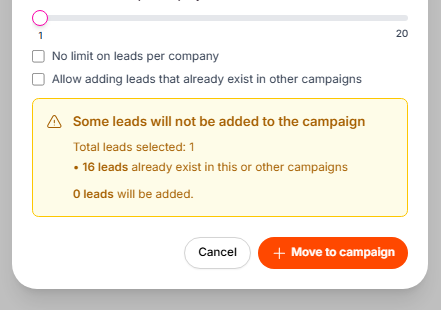
5. Confirm the Move Click the orange Move to campaign button. Your leads will instantly vanish from their current list and appear in their new campaign, ready for the next step in their journey.
Keep the momentum going! ⚡ Moving leads is a fantastic way to ensure the right people are getting the right messages at the perfect time. Keep refining your lists, and watch those reply rates climb!