Not all leads are created equal. When you are staring at a massive list of prospects, figuring out who to reach out to first can feel overwhelming. That is where Seleqt’s AI Lead Score comes in to save the day!
Seleqt acts as your personal data analyst, looking at buying signals and profile completeness to automatically score your leads, allowing you to prioritize the people most likely to reply.
Here is everything you need to know about using AI Lead Scores to supercharge your workflow.
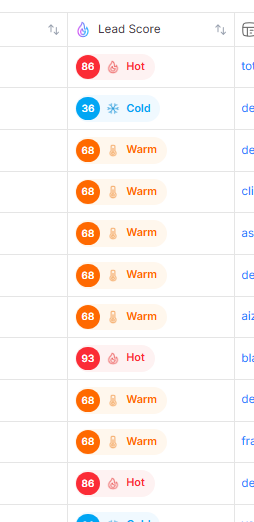
Seleqt grades every lead on a scale of 0 to 100 and groups them into three easy-to-read categories:
🔥 Hot (80 and above): Your top priority! These leads have highly complete profiles and strong buying signals.
☀ Warm (60 to 79): Solid prospects that are definitely worth your attention.
❄ Cold (Below 60): Leads that might need a bit more nurturing or data enrichment before you reach out.
We keep your screen clean by showing the score as a simple status icon by default. You can find this icon in two main places:
1. The Main List View Look for the dedicated Score column in your campaign list. You will see a Hot, Warm, or Cold icon next to each prospect.
💡 Pro Tip: Want to see the exact math? Just hover your mouse over any score icon, and a helpful tooltip will instantly reveal the exact numerical score and label!
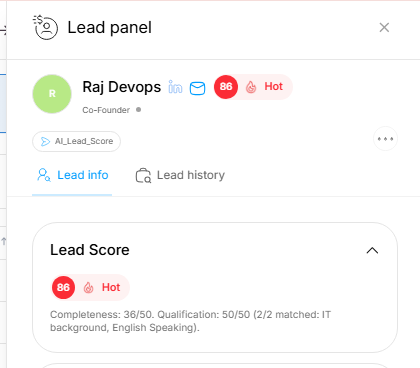
2. The Lead Panel When you click on a specific prospect to view their details, their AI Lead Score is also displayed right inside their individual Lead Panel, giving you full context before you type your message.
The AI Lead Score isn't just for looking at—it is a powerful tool for organizing your day!
Sorting: Click the header of the Score column to instantly sort your entire list. Bring all your 🔥 Hot leads to the very top so you can tackle your best opportunities first.
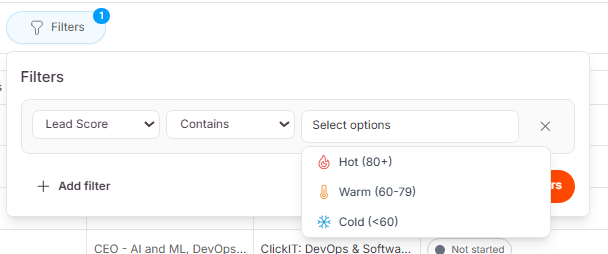
Filtering: Use the main Filters menu to drill down even further. You can apply a filter to only show Warm or Hot leads, temporarily hiding the Cold ones so you can focus your outreach strategy.
🧮 How the Score is Calculated (The 50/50 Rule)
Every lead in your campaign is graded on a scale from 0 to 100. To make this fair and accurate, Seleqt splits the score into two equal halves:
Half 1: Profile Completeness (Up to 50 Points) The system checks the prospect's profile for 7 key pieces of information: Email, Phone Number, LinkedIn URL, Job Title, Company, Industry, and Location.
Each filled field is worth roughly 7.14 points.
If all 7 fields are filled, the lead gets a perfect 50/50 for this section!
Half 2: AI Qualification (Up to 50 Points) The remaining 50 points are based on the custom "AI Qualification Signals" you set up for your campaign. The 50 points are split evenly across your questions.
If you have two qualification questions (e.g., "Do they have an IT background?" and "Do they speak English?"), each question is worth 25 points.
If Seleqt's AI researches the prospect and answers "Yes" to both, they get the full 50 points! If the AI answers "No," they get 0 points for that specific question.
💡 What if I don't use AI Qualifications? No problem! If you haven't set up any custom AI questions, Seleqt will simply take your Profile Completeness score and multiply it by 2 so your leads can still be graded on the standard 100-point scale.
Work smarter, not harder! 🚀
By letting Seleqt's AI do the heavy lifting of qualifying your leads, you can spend less time researching and more time closing deals with your best prospects!