To keep your outreach running smoothly and protect your LinkedIn account from getting restricted, it is crucial to stay within LinkedIn's allowed daily limits. Because LinkedIn gives different limits to different subscription tiers, Seleqt is designed to recognize your account type and automatically adjust your maximum sending limits for you!
Here is a breakdown of how the limits change based on your LinkedIn account type and where you can see them in action.
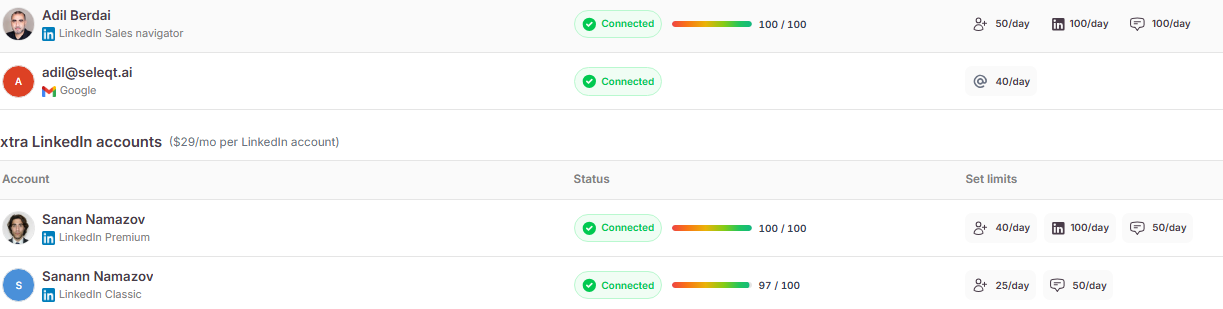
You can view all your connected accounts and their specific limits by navigating to Settings > Sender accounts. Seleqt categorizes your LinkedIn accounts into three tiers:
🥉 LinkedIn Classic (Free): Because this is a free account, the limits are the strictest. Seleqt caps these accounts at 25 connections and 50 messages per day.
🥈 LinkedIn Premium: With a standard paid subscription, your limits get a slight bump. Premium accounts are capped at 40 connections, 50 messages, 100 Inmails per day.
🥇 LinkedIn Sales Navigator: This is LinkedIn's top-tier sales tool, so it gets the highest allowance! Sales Navigator accounts can send up to 50 connections and 100 messages, 100 Inmails per day.
Seleqt makes sure you never accidentally over-send when setting up a new campaign.
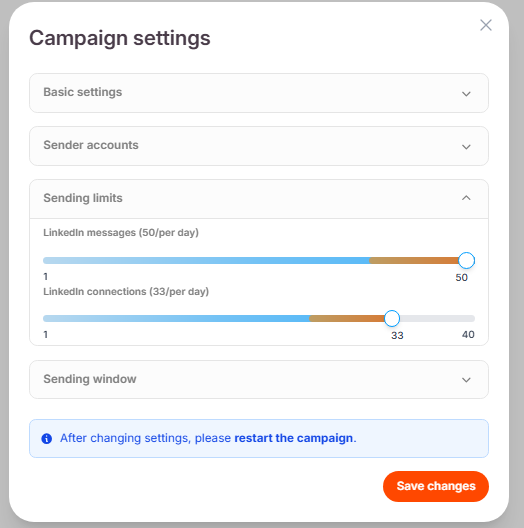
When you go to your Campaign settings and scroll down to the Sending limits section, you will see slider bars for your daily messages and connection invites.
Watch the magic happen: If you change the designated LinkedIn account in the dropdown menu just above those sliders, the maximum numbers on the sliders will instantly and automatically update to match that specific account's limits!
Keep your outreach safe and steady! 🛡 By automatically capping your daily limits based on your subscription type, Seleqt ensures your account stays in good standing while still maximizing your daily outreach potential. Happy sending!