With AI Message Personalization, you can create dynamic email templates that adapt to each recipient. By pulling information from specific data sources, the AI crafts unique messaging that feels human and researched, allowing you to scale your outreach without sacrificing quality.
Here is your step-by-step guide to setting up and using AI Message Personalization!
You can design specific instructions that dictate exactly how the AI should research and write your custom snippets.
The Personalization Hub: Head to the AI message personalization tab in your left-hand menu. Here you will find our pre-built Default personalizations alongside Your personalizations.
Building New Instructions: Click the orange New personalization button. Give it a clear name (e.g., "Relevant Industry Pain Point") and tell the AI what to write in the prompt box.
💡 Pro Tip: Use Dynamic Variables Make your AI instructions even smarter by inserting dynamic placeholders directly into your prompt. You can use variables like
{{company_name}},{{first_name}},{{last_name}},{{job_title}}, and{{email}}to guide the AI's research.
Polishing Your Prompt: Not sure if your instructions are clear? Click the Polish with AI button to automatically refine, structure, and perfect your prompt text.
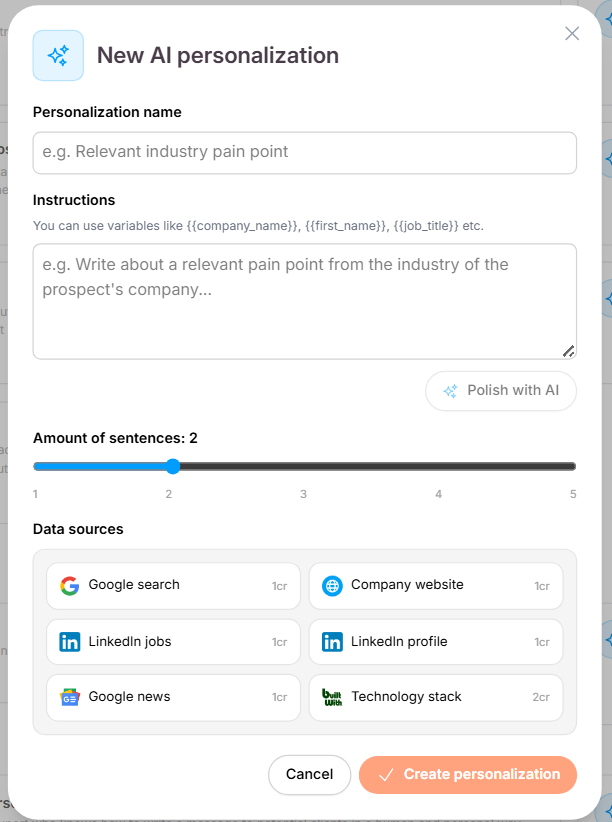
To keep your emails concise and accurate, Seleqt gives you absolute control over the output rules:
The Sentence Slider: Use the dedicated length slider to set exactly how long the generated text should be—from a brief 1-sentence hook up to a maximum of 5 sentences.
Targeted Data Sources: Tell the AI exactly where to look for information. You can check or uncheck specific data streams depending on your strategy:
Google Search & Google News
Company Website
LinkedIn Profiles & LinkedIn Jobs
Technology Stack
Once your personalization style is saved, you can seamlessly integrate it directly into your email sequences.
Navigate to your active campaign and open the Steps tab.
Click into any Send email step to open your message editor.
Click the AI personalization button right inside the text area.
Select your custom personalization from the list, verify your sentence count and data settings, and click Insert & update unique.
The dynamic placeholder snippet will drop right into your message body, allowing you to wrap your standard intro or pitch perfectly around it.
Never launch blindly. Seleqt lets you test your personalizations against real leads in your list before sending a single live email.
Generate Previews: Click the Preview message button below your email editor.
Select a Lead: Choose a specific prospect from the dropdown menu and hit Generate preview. The AI will instantly go to work scanning your selected data sources and show you the exact text that lead will receive.
Need a Rewrite? If you aren’t 100% happy with the style, just click Generate again to watch the AI spin up a fresh, unique variation instantly.
Work smarter, not harder! 🚀 By letting Seleqt automatically research and write personalized snippets for every prospect on your list, you can scale your campaign volume while keeping a completely human, high-converting touch. Have a beautiful day and happy sending!